外观
Id4+Ocelot+Consul
什么是identityServer4
身份认证和授权协议,实现了openid和OAuth2.0协议,一个中间件,用于把一些项目联系起来。可以添加到任意的.NET Core项目中
作用
- 保护资源,颁发验证使用令牌
- 会话管理,单点登录
JWT、OAuth2.0
- jwt是一种具体,自身包含逻辑的token框架实现
- OAuth规划,协议,授权机制
模式
- 客户端模式
- 指定客户端标识,指定密码, 没有特定user登录
- 客户端模式
客户端模式code
1.auth权限中心
      app.UseIdentityServer(); //添加id4


 		var res = new List<ApiResource> {    //资源访问限制
                    new ApiResource("UserApi","用户获取API")
                    {
                        Scopes = { "UserApi" }
                    }
                };
            var sco = new List<ApiScope> {    //
                    new ApiScope("UserApi")
                };
            IEnumerable<Client> client = new[]{   //InMemory 内存模式
                     new Client{
                          ClientId ="Comeon.Auth",
                          ClientSecrets = new []{ new Secret("a123456".Sha256())  },
                          AllowedGrantTypes = GrantTypes.ClientCredentials,
                          AllowedScopes ={ "UserApi"},
                          Claims = new List<ClientClaim>(){
                              //new ClientClaim(IdentityModel.JwtClaimTypes.Role,"Admin"),
                              new ClientClaim(IdentityModel.JwtClaimTypes.NickName,"testusr"),
                              //new ClientClaim("email","[email protected]")
                          }
                     }
                };
 			services.AddIdentityServer()
                .AddDeveloperSigningCredential() //默认开发者临时证书(第一次请求时会获取公钥)
                .AddInMemoryClients(client) //添加验证信息
                .AddInMemoryApiScopes(sco) //api域限制
                .AddInMemoryApiResources(res); 		//resouces 资源保护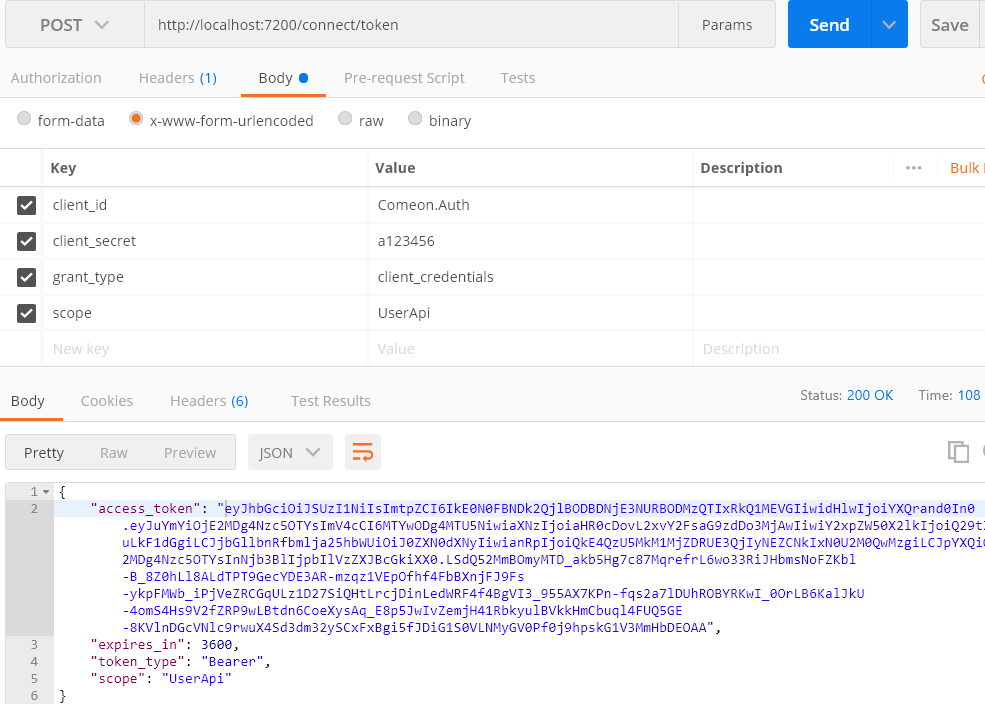
api
    安装IdentityServer4.AccessTokenValidation

     app.UseAuthentication(); //先鉴权 验证
     app.UseAuthorization(); //再授权

	Api函数添加[Authorize]特性

     services.AddAuthentication("Bearer")
                .AddIdentityServerAuthentication(OptionsBuilderConfigurationExtensions =>
                {
					options.Authority = "http://localhost:7200"; //id4 服务地址
                    options.ApiName = "UserApi";
                    options.RequireHttpsMetadata = false; //不需要https
                });
需要解决一个信任问题
- 非对称可逆加密 。 加密key和解密key不一样 。公开解密key(公钥),私有解密key(私钥)
- 非对称:加密key和解密key不同,无法推导
- 可逆加密: 就是可解密
场景:
登录成功=>>获取用户信息=>>私钥加密=>>作为token返回=>>公钥解密
就可以保障信息安全,因为公钥能解开私钥信息 说明该信息是可以信任的
微服务模式
使用consul
作用:
- 发现服务、健康检查
- 运行:
consul agent -dev - 可以看到运行的服务:http://localhost:8500/
- 运行:
使用Ocelot
源码:https://github.com/ThreeMammals/Ocelot/releases
作用:
路由功能
- 转发,穿透请求(接外网转内网)
- 集群负载
- 缓存 :网关层就返回,不会去请求服务实例
- 流量管理
 		public void ConfigureServices(IServiceCollection services)
        {
            string AuthProviderKey = "GatewayKeyAuth"; //对应配置文件
            services.AddAuthentication("Bearer")
                .AddIdentityServerAuthentication(AuthProviderKey, options =>
                {
                    options.Authority = "http://localhost:7200"; //id4 服务地址
                    options.ApiName = "UserApi";
                    options.RequireHttpsMetadata = false;        //不需要https
                    options.SupportedTokens = IdentityServer4.AccessTokenValidation.SupportedTokens.Both;
                });

            services.AddOcelot()               //重点在配置文件 configuration.json
                .AddConsul()                   //使用consul治理服务 Ocelot.Provider.Consul
                .AddCacheManager(m =>          //使用缓存 Ocelot.Cache.CacheManager  可实现IOcelotCache 自定义缓存
                {
                    m.WithDictionaryHandle();//默认字典存储
                })
                .AddPolly();                                //瞬态故障库 限流  Ocelot.Provider.Polly
         }


        public void Configure(IApplicationBuilder app, IWebHostEnvironment env)
        {
            app.UseOcelot().Wait();
        }
Ocelot结合Consul 做到集群与服务发现。使用.
  /***************Ocelot配置文件。(url默认不区分大小写)******************/
  /**********************单ocelot****************************/
  "Routes": [
    {
      "UpstreamPathTemplate": "/T7526/{url}", //入口地址
      "UpstreamHttpMethod": [ "Get", "Post" ],

      "DownstreamPathTemplate": "/{url}", //映射转换为改地址
      "DownstreamScheme": "http",
      "DownstreamHostAndPorts": [
        {
          "Host": "127.0.0.1",
          "Port": 8003
        }
      ]
    }
  ]
}
{
/**********************ID4+Ocelot(限流、缓存)+consul*************************/
"Routes": [
{
"UpstreamPathTemplate": "/T/{url}", //入口地址
"UpstreamHttpMethod": [ "Get", "Post" ],
"DownstreamPathTemplate": "/{url}", //映射转换为改地址
"DownstreamScheme": "http",
"UseServiceDiscovery": true, //使用服务发现
"ServiceName": "ApiService", //Consul服务名称
"LoadBalancerOptions": { //负载均衡选项
"Type": "RoundRobin"
},
"FileCacheOptions": { //缓存配置
"TtlSeconds": 15
},
"RateLimitOptions": { //限流
"ClientWhitelist": [ "Yuchen" ], //白名单 ClientId 区分大小写
"EnableRateLimiting": true, //是否启用限流
"Period": "1s", // 统计时段 1s, 5m, 1h, 1d内
"Limit": 1, //最多访问几次
"PeriodTimespan": 5 // 超限之后 多少时间后才能继续请求(秒)
},
"AuthenticationOptions": { //id4 鉴权
"AuthenticationProviderKey": "GatewayKeyAuth",
"AllowedScope": []
}
}
],
"GlobalConfiguration": {
"BaseUrl": "http://127.0.0.1:6299", //网关对外地址
"ServiceDiscoveryProvider": {
"Host": "127.0.0.1",
"Port": 8500,
"Type": "Consul" //指定consul发现服务
},
"RateLimitOptions": {
"QuotaExceededMessage": "Too Fast!!!", //消息过载时返回提示信息
"HttpStatusCode": 999, //错误码 httpcode
//"ClientIdHeader": "Test"
}
}
}结合网关与id4之后,鉴权就是在网关层做的了,与api层不相关联 api层也不需要验证权限了
# API:
dotnet Comeon.Api.dll --urls=http://localhost:5726 --ip="127.0.0.1" --port=5726
dotnet Comeon.Api.dll --urls=http://localhost:5727 --ip="127.0.0.1" --port=5727
dotnet Comeon.Api.dll --urls=http://localhost:5728 --ip="127.0.0.1" --port=5728

# Gateway 网关
dotnet Comeon.Gateway.dll --urls=http://127.0.0.1:6299


#Auth ID4
dotnet Comeon.AuthenticationCenter.dll --urls=http://127.0.0.1:7200 --port=7200

#Consul 地址 与运行命令
Consul agent -dev -node 127.0.0.1
http://127.0.0.1:8500
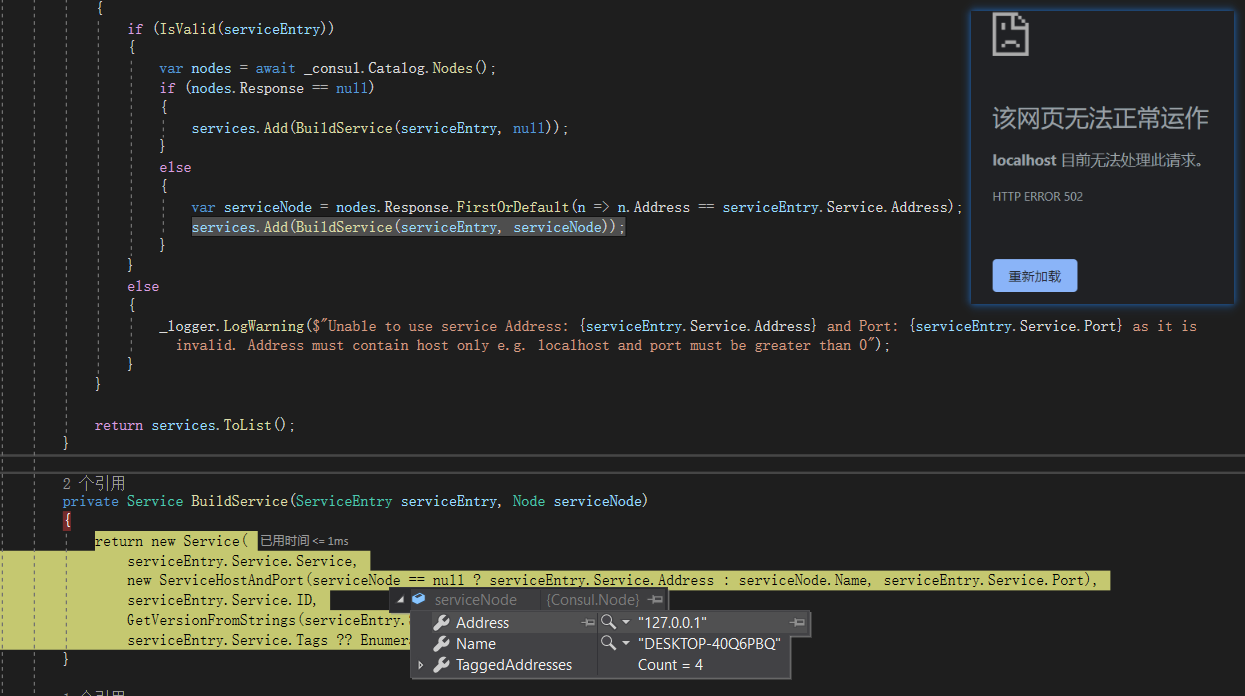
502 问题(16.0版本)
查看源码可以知道 如果是本机访问则返回机器名,不同电脑才返回ip
简单解决办法,启动consul时:Consul agent -dev -node 127.0.0.1